August 17, 2026 .Net AutomatedTesting
Microsoft Testing Platform and Reporting Improvements
Microsoft recently released improvements to the Microsoft Testing Platform, enhancing the reporting capabilities for .Net applications. This article was certainly written by AI and has a lot of content, but not a good example to follow. I had some time, so I got it working and have an example to share.
These improvements look promising for larger projects with a lot of tests (you have automated tests right?).
This will probably change as they are still working on these packages.
Microsoft Learn - Testing Platform Test Reports has more documentation and a few images.
Several features that caught my eye:
- Reporters that work for both Azure DevOps (ADO) and GitHub Actions
--report-ado,--report-gh- “Azure DevOps has the same shape behind –report-azdo, and it offers something GitHub Actions doesn’t have yet. With –publish-azdo-test-results, results stream into the Tests tab while the run is still going — instead of arriving from a separate publish step that only runs if the job survives to reach it. The two are independent: –report-azdo handles annotations and logging, –publish-azdo-test-results handles the Tests tab, and either works alone.”
- ADO has a feature that GitHub Actions does not have yet.
--report-azdo-demote-known-flaky- “turns known flaky failures into warnings”--report-azdo-slow-test-history- “compares each test against its own past”
- testconfig.json and Directory.Build.props - to share the settings across a repository
- I’m not sure how to use this yet, but “
--list-tests jsonemits a schema-versioned document describing every discovered test, down to its source location”
Examples
Pipeline Yaml
  - ${{ if eq(parameters.mtp, 'true') }}:
    - script: |
        dotnet test \
          ${{ parameters.rootFolder }}/*Tests/*.csproj \
          --configuration ${{ parameters.buildConfiguration }} \
          --verbosity normal \
          -- \
          --coverage \
          --coverage-output "$(Agent.TempDirectory)/coverage.cobertura.xml" \
          --coverage-output-format cobertura \
          --report-trx \
          --report-html \
          --report-azdo \
          --publish-azdo-test-results \
          --report-azdo-upload-artifacts files
      displayName: 'Run tests and collect coverage (MTP)'

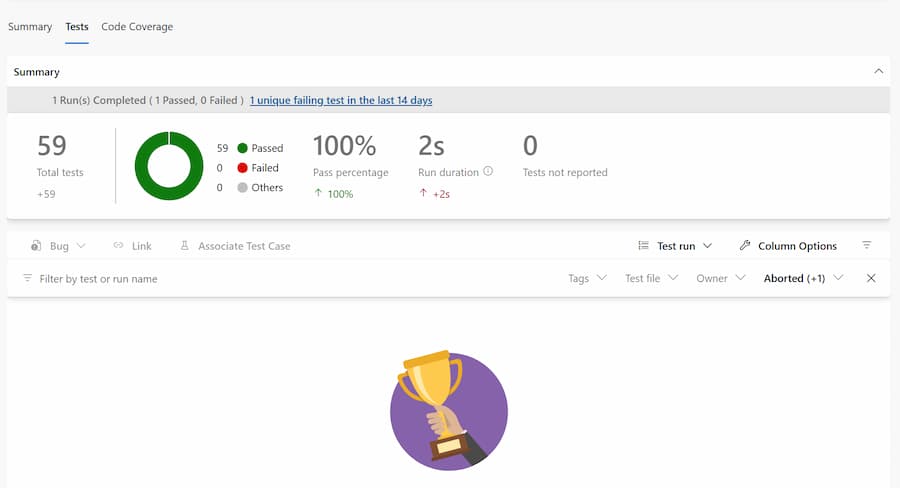
 # if a test fails or all pass I want to see the Test tab, --publish-azdo-test-results doesn't seem to run (8/14/26, maybe it will get better)
  - task: PublishTestResults@2
    displayName: 'Publish test results (MTP)'
    condition: succeededOrFailed()
    inputs:
      testResultsFormat: VSTest
      testResultsFiles: '*.trx'
      searchFolder: '$(System.DefaultWorkingDirectory)/TestResults'
      failTaskOnFailedTests: false
      failTaskOnMissingResultsFile: false
  - task: PublishCodeCoverageResults@2
    displayName: 'Publish Code Coverage'
    # comment this out if you don't want to see the Code Coverage tab on any test failures
    condition: succeededOrFailed()
    inputs:
      summaryFileLocation: '$(Agent.TempDirectory)/**/*.cobertura.xml'
      failIfCoverageEmpty: false
<Project Sdk="Microsoft.NET.Sdk">
  <PropertyGroup>
    <TargetFramework>net10.0</TargetFramework>
    <ImplicitUsings>enable</ImplicitUsings>
    <Nullable>enable</Nullable>
    <IsPackable>false</IsPackable>
    <OutputType>Exe</OutputType>
  </PropertyGroup>
  <ItemGroup>
    <PackageReference Include="Microsoft.Extensions.TimeProvider.Testing" Version="10.9.0" />
    <PackageReference Include="Microsoft.Testing.Extensions.AzureDevOpsReport" Version="2.3.3" />
    <PackageReference Include="Microsoft.Testing.Extensions.HtmlReport" Version="2.3.3" />
    <PackageReference Include="NSubstitute" Version="6.2.0" />
    <PackageReference Include="NSubstitute.Analyzers.CSharp" Version="1.0.17" />
    <PackageReference Include="Microsoft.Testing.Extensions.CodeCoverage" Version="18.10.0" />
    <PackageReference Include="Microsoft.Testing.Extensions.TrxReport" Version="2.3.3" />
    <PackageReference Include="Microsoft.Testing.Platform" Version="2.3.3" />
    <PackageReference Include="xunit.v3.mtp-v2" Version="3.2.2" />
  </ItemGroup>
  <ItemGroup>
    <ProjectReference Include="..\Api.csproj" />
  </ItemGroup>

  <ItemGroup>
    <Using Include="Xunit" />
  </ItemGroup>

  <ItemGroup>
    <Content Include="xunit.runner.json" CopyToOutputDirectory="PreserveNewest" />
  </ItemGroup>
</Project>
Diretory.Build.props
<Project>
  <PropertyGroup>
    <!-- Enable the Azure DevOps reporter -->
    <EnableMicrosoftTestingReporterAzureDevOps>true</EnableMicrosoftTestingReporterAzureDevOps>

    <!-- Enable slow test detection using history -->
    <EnableMicrosoftTestingSlowTestHistory>true</EnableMicrosoftTestingSlowTestHistory>

    <!-- Optional: Configure the threshold (default is usually 2x) -->
    <TestingExtensionsAzureDevOpsSlowTestThreshold>2</TestingExtensionsAzureDevOpsSlowTestThreshold>

    <!-- Optional: Configure the minimum runs required -->
    <TestingExtensionsAzureDevOpsSlowTestMinimumRuns>5</TestingExtensionsAzureDevOpsSlowTestMinimumRuns>
  </PropertyGroup>
</Project>
xunit.runner.json
{
    "$schema": "https://xunit.net/schema/current/xunit.runner.schema.json"
}
See my updated template line 75.
Watch the Story for Good News
Use Swan Bitcoin to onramp with low fees and automatic daily cost averaging and get $10 in BTC when you sign up.
I gladly accept BTC Lightning Network tips at
strike.me/aligned
Check out my Resources Page for referrals that would help me.
Use Swan Bitcoin to onramp with low fees and automatic daily cost averaging and get $10 in BTC when you sign up.
Use the Brave browser to block ads and trackers!